Your endpoint returns 200. Your UI works. You move on.
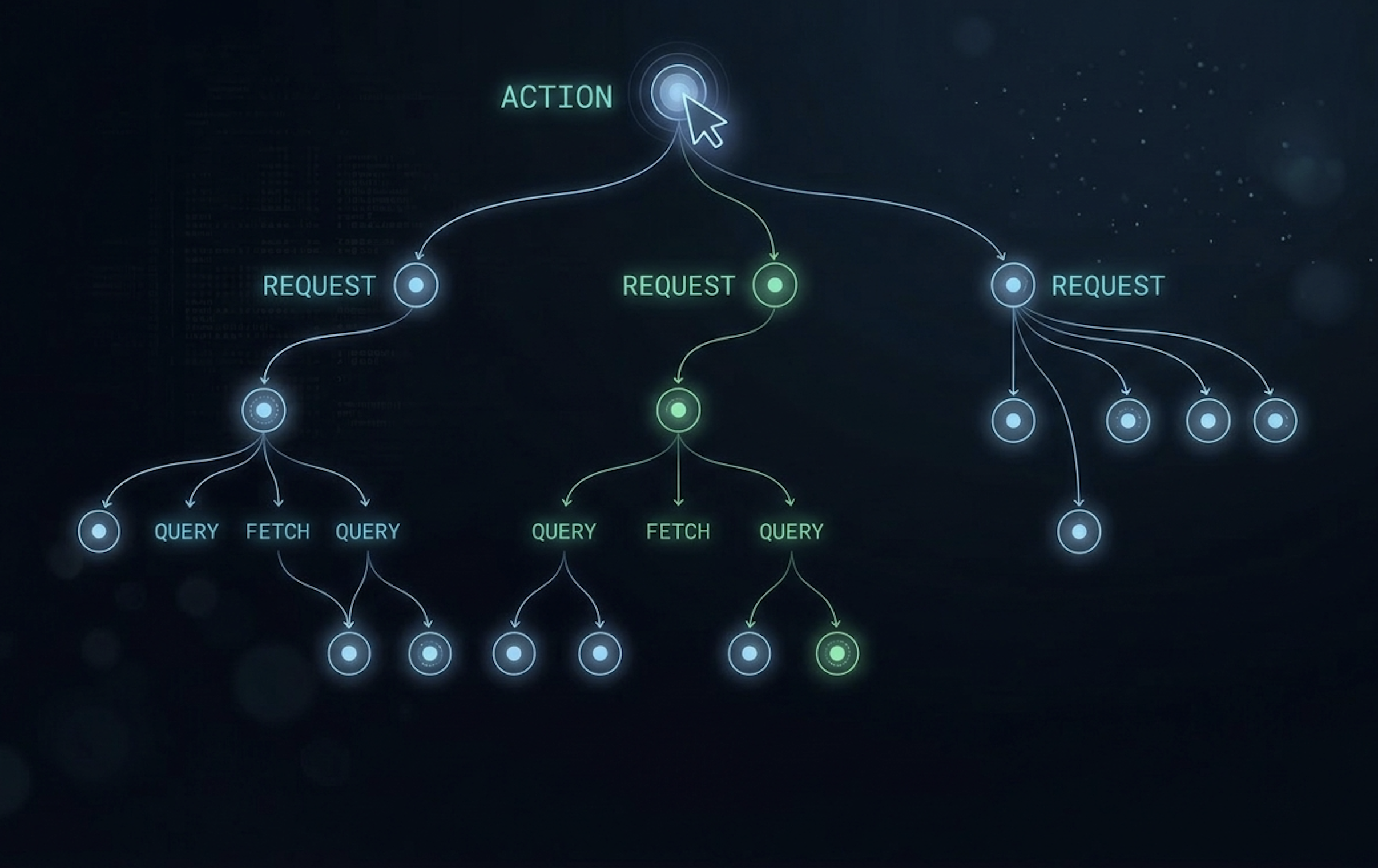
But you never actually saw what happened behind that 200. How many database queries fired. Whether the same query ran on every single page. Whether an external API got called twice. Whether one user action triggered 3 requests, 8 queries, and a Stripe charge you didn't expect.
This is the reality for most developers. We build APIs every day, but we don't have a simple way to see them as a whole.
DevTools shows raw HTTP requests in a flat list. Logs are scattered across files. Database queries live in a completely separate world. Nothing connects them. Nothing shows you "when a user clicked Checkout, here's everything your backend did."
That's what Brakit does.
Brakit is an open source, local-first dev tool for full-stack applications. With one command, it hooks into your app and captures every HTTP request, database query, and external fetch. Then it groups them by the user action that triggered them.
Instead of 47 raw requests in DevTools, you see everything nested, timed, and connected to a single user action:
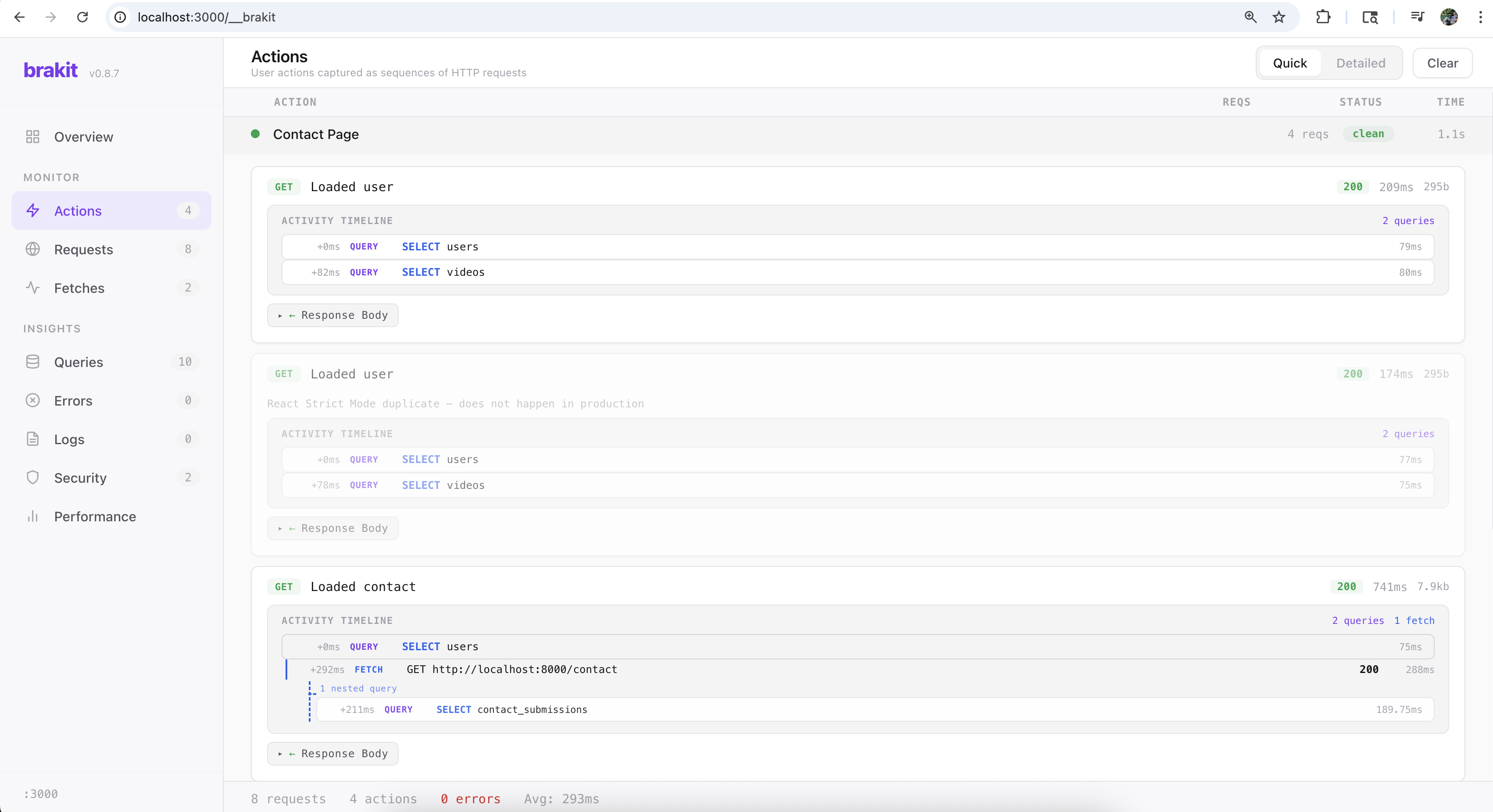
The inspiration came from Laravel Telescope. If you've used Telescope in PHP, you know how valuable it is to see your queries and requests during development. We looked for something similar in the Node.js ecosystem and it just didn't exist.
But we wanted to go further than Telescope. Telescope shows queries under individual requests. Brakit groups the requests themselves under user actions. That one level of grouping changes everything, because the most interesting problems aren't inside a single request. They're across requests.
A query that runs on every page. A fetch that fires twice in one action. An endpoint that got slower after last week's refactor. These patterns are invisible when you look at endpoints in isolation. They become obvious when you see all your endpoints together.
Because Brakit sees your entire API as a connected system, patterns surface automatically.
One developer builds a dashboard that queries users. Another builds settings, also querying users. A third builds checkout, same query again. Each file passes code review. But Brakit shows the same SELECT running on every page load, data that should be fetched once and cached.
A loop that fires the same query for each item instead of batching. The endpoint returns 200. The UI works. But the database is doing 50 queries where it should do 1. Brakit flags the pattern instantly.
Two React components on the same page both fetching /api/user independently. Same request, same response, wasted round trip. Brakit groups them under the same action and shows the duplication.
An endpoint that responded in 120ms last week now takes 400ms. Brakit tracks endpoint health across sessions so you see the change the moment it happens.
Stack traces in error responses. PII in response bodies. Insecure cookies. Auth tokens in URLs. Because Brakit sees every response, it runs security rules on live traffic automatically.
Brakit has a built-in MCP server. That means AI coding tools like Cursor and Claude Code can read every finding Brakit captures: the requests, queries, timing data, and detected issues.
Type "fix brakit findings" in your editor. The AI gets full runtime context and fixes the code. Brakit verifies the fix worked by checking the next set of live traffic.
The full loop: you develop, Brakit watches, Brakit finds issues, AI fixes them, Brakit verifies.
Getting started takes one command. Head over to the installation guide for step-by-step setup instructions.
Then run your app normally. Brakit hooks in through an instrumentation file and captures everything. Your dashboard lives at localhost:3000/__brakit.
No proxy. No separate terminal. No environment variables. No SDK to import in your route files. Your app runs on the same port, the same way it always did. Brakit is invisible until you open the dashboard.
It does nothing in production. Multiple layers of checks ensure Brakit only activates in development, including environment detection, cloud platform checks, and localhost-only dashboard access.
Head over to the getting started guide to set up Brakit in your project.
We'd love your feedback. Open an issue, star the repo, or just try it on your project and tell us what you think.