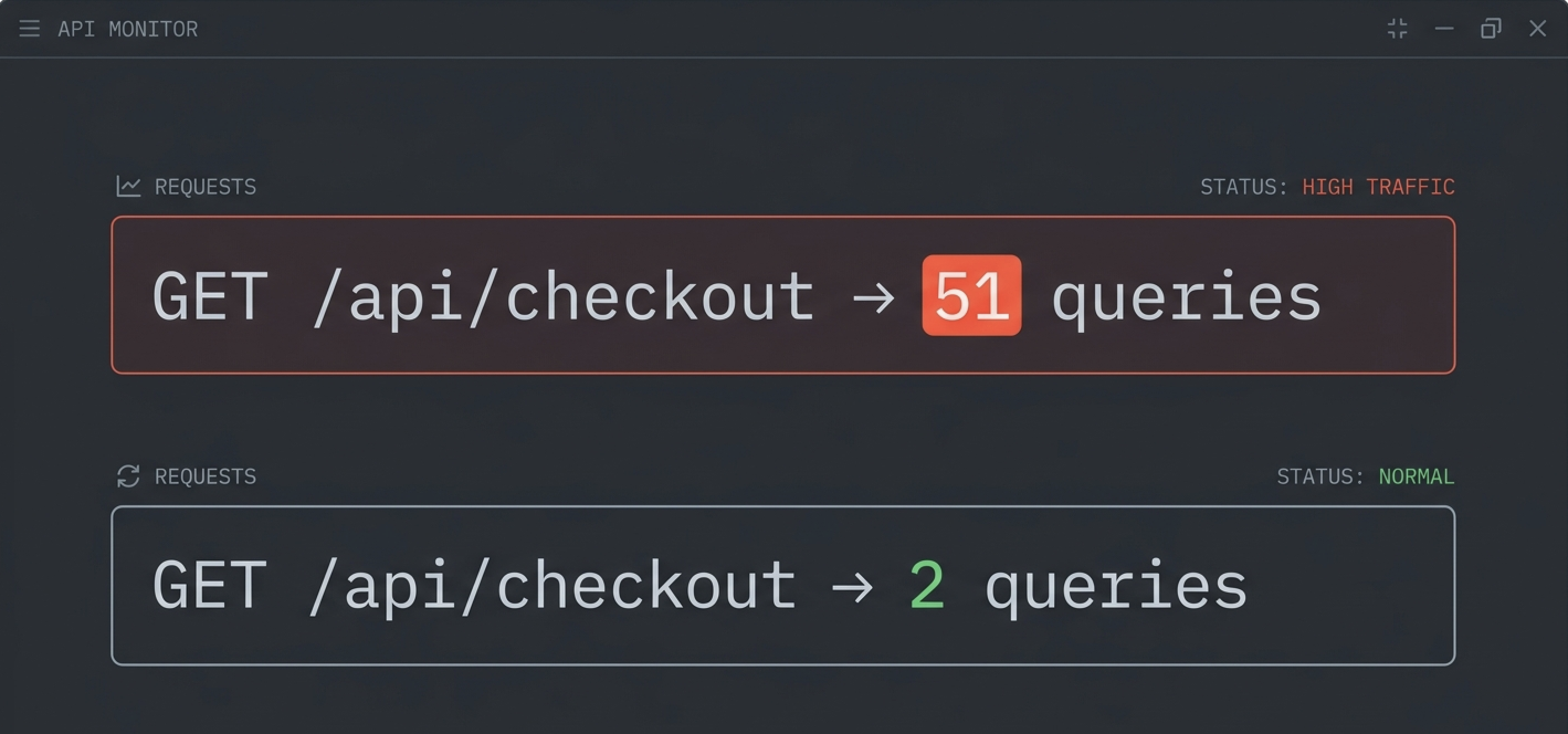
You have a checkout endpoint. A user adds 8 items to their cart and hits "Place Order." Your API validates each item's stock, calculates shipping, charges the card, and returns a confirmation. 200 OK. Tests pass. Ships.
Behind that response, 17 database queries just fired. One to load the cart. Then 8 to check inventory, one per item, in a loop. Then 8 more to look up shipping weights. No error. No warning. Just 16 unnecessary round trips to your database that nobody will notice until Black Friday.
This is an N+1 query. The most common performance problem in backend applications. And it doesn't look like a bug. It looks like clean, well-structured code.
An N+1 query is a database access pattern where your code executes 1 query to fetch a list of N items, then fires N additional queries to fetch related data for each item one at a time. Instead of 1 or 2 queries, you end up with N+1.
The name comes from the math. You have a cart with 8 items. You run 1 query to load the cart, then 8 queries to validate each item's stock. That's 1 + 8 = 9 queries for something a single WHERE sku IN (...) could handle.
Multiply that across every endpoint that loops over a list, and you're running 10x to 100x more database queries than your application needs.
An N+1 query is a loop that makes N individual database calls, one per item, when a single batched query could do the same job. It rarely looks like a bug. It looks like a well-factored function being called in a loop. The kind of code that passes code review because each piece is correct in isolation.
Here's a checkout flow that every backend developer has written some version of:
// POST /api/checkout
app.post('/api/checkout', async (req, res) => {
  const cart = await prisma.cart.findUnique({
    where: { id: req.body.cartId },
    include: { items: true }
  }); // 1 query, fine

  for (const item of cart.items) {
    const inventory = await prisma.inventory.findUnique({
      where: { sku: item.sku }
    }); // N queries, 1 per item

    if (inventory.quantity < item.quantity) {
      return res.status(400).json({ error: `${item.sku} out of stock` });
    }
  }

  // ... charge card, create order
  res.json({ success: true });
});
8 items in the cart = 9 database queries. The code is readable. The validation logic is correct. A code reviewer sees a loop that checks stock for each item, exactly what the business logic requires. The N+1 is invisible because prisma.inventory.findUnique() is a clean, single-purpose call. Nobody thinks "this fires once per loop iteration."
But that's the obvious version. Here are the patterns that actually trip up experienced developers:
// lib/inventory.ts, clean, reusable, well-tested
export async function validateStock(item: CartItem) {
  const inventory = await prisma.inventory.findUnique({
    where: { sku: item.sku }
  });
  if (!inventory || inventory.quantity < item.quantity) {
    throw new InsufficientStockError(item.sku);
  }
  return inventory;
}

// routes/checkout.ts, looks perfectly reasonable
app.post('/api/checkout', async (req, res) => {
  const cart = await getCart(req.body.cartId);

  for (const item of cart.items) {
    await validateStock(item); // <-- N+1 hidden behind a function call
  }

  await chargeCard(cart);
  res.json({ success: true });
});
The query is in a different file. The person reviewing checkout.ts doesn't see a database call. They see a validation function. The person reviewing inventory.ts doesn't see a loop. They see a single-item helper. Neither reviewer catches the N+1. It only exists at runtime, when the two files compose together.
// "I'll parallelize it, that's faster, right?"
const stockChecks = await Promise.all(
  cart.items.map(item =>
    prisma.inventory.findUnique({ where: { sku: item.sku } })
  )
);
This runs all 8 queries concurrently instead of sequentially. Developers write this and feel good about it. They "optimized" the loop. But it's still 8 database round trips, 8 connection pool checkouts, and 8x the load on your database. Parallel N+1 is still N+1. The fix is 1 batched query, not 8 concurrent ones.
// app/dashboard/page.tsx
export default async function Dashboard() {
  const projects = await prisma.project.findMany({
    where: { teamId: session.teamId }
  });

  return (
    <div>
      {await Promise.all(projects.map(async (project) => {
        const lastDeploy = await prisma.deployment.findFirst({
          where: { projectId: project.id },
          orderBy: { createdAt: 'desc' }
        });
        const memberCount = await prisma.projectMember.count({
          where: { projectId: project.id }
        });
        return (
          <ProjectCard
            key={project.id}
            project={project}
            lastDeploy={lastDeploy}
            memberCount={memberCount}
          />
        );
      }))}
    </div>
  );
}
10 projects = 21 queries. One for the list, 10 for deployments, 10 for member counts. This looks like the examples in every Next.js tutorial. The async .map() pattern is textbook RSC. Every query is a clean, single-purpose call. And the whole page fires 20 unnecessary queries every time it loads.
N+1 queries are hard to catch because the code looks correct in isolation. Each individual query succeeds, and the performance problem only shows up at runtime when the loop runs against real data.
A few things work together to keep them hidden:
The query is in a different file. Your checkout route calls validateStock(). The database call lives in lib/inventory.ts. No single file contains both the loop and the query. The N+1 only exists in the composition, not in any individual function.
Code review can't catch it. A reviewer sees a loop that validates each item. The logic is correct. They'd need to trace into the helper function, realize it contains a query, and mentally multiply that by the loop size. On a real PR with 15 changed files, nobody does this.
Tests pass. Unit tests mock the database. Integration tests seed 2 or 3 items. With 3 items, 4 queries take 8ms total. The N+1 is technically present in your test suite. It just doesn't hurt yet.
AI coding assistants generate this pattern constantly. They produce correct code from file-level context, but have no awareness of how many queries that code will produce at runtime. The helper-function-in-a-loop pattern is the most natural way to write this logic, and that's exactly why it's the most common performance bug.
It works fine in development. Your dev database has 3 cart items. 4 queries at 2ms each = 8ms. Production has carts with 25 items during a sale. Same code, 26 queries, under 50x the concurrent load.
An N+1 query multiplies your database round trips linearly with your data size. What starts as a 5ms operation becomes a 500ms bottleneck as your dataset grows.
Take the checkout example. Here's how stock validation scales:
| Cart items | Queries (N+1) | Queries (batched) | DB time at 2ms/query |
|---|
| 3 (dev) | 4 | 2 | 8ms |
| 8 (typical) | 9 | 2 | 18ms |
| 25 (sale) | 26 | 2 | 52ms |
| 100 (bulk order) | 101 | 2 | 202ms |
Each query isn't just "2ms of SQL." It's a connection pool checkout, network round trip, query parsing, result serialization, and deserialization. Under concurrent load, 100+ queries from a single request can exhaust your connection pool and block every other request in your application.
Here's what actually happens: your integration tests have 3 cart items. Production has 25 during a flash sale, with 200 concurrent users. The N+1 that felt invisible at 8ms is now a 52ms bottleneck on every checkout, competing for the same connection pool. By the time someone notices the endpoint is slow, it's been shipping for months.
The most reliable way to detect N+1 queries is to count your database queries per request at runtime. If a single endpoint fires the same query shape dozens of times, you have an N+1.
You can do this manually. Prisma exposes a query event:
prisma.$on('query', (e) => {
  console.log(`${e.query} - ${e.duration}ms`);
});
But this dumps every query to your console with no grouping, no per-request counts, and no way to tell which endpoint triggered which queries. You'd have to manually count and correlate. It works for one-off debugging but not for catching N+1s you don't already suspect.
Brakit automates this. It captures every database query per request, groups them by endpoint and user action, and flags when the same query shape fires 5 or more times in a single request. That's the telltale signature of an N+1.
You don't add logging or change your queries. You run npx brakit install, start your dev server, and open /__brakit. Every N+1 shows up with the endpoint, the repeated query, and the count.
Brakit also exposes findings through MCP, so if you use Claude or Cursor, your AI assistant can read the N+1 finding directly, see the offending query, and suggest the fix. No copying and pasting.
Fix an N+1 query by replacing the loop of individual fetches with a single query that loads all related data at once. You can use eager loading, joins, or batch queries depending on the situation.
The checkout validation loop is the most common case. Replace the per-item query with a single batch:
// Before: 1 + N queries
for (const item of cart.items) {
  const inventory = await prisma.inventory.findUnique({
    where: { sku: item.sku }
  });
  if (inventory.quantity < item.quantity) {
    throw new InsufficientStockError(item.sku);
  }
}

// After: 1 + 1 queries
const skus = cart.items.map(item => item.sku);
const inventoryRecords = await prisma.inventory.findMany({
  where: { sku: { in: skus } }
});

const inventoryMap = new Map(inventoryRecords.map(inv => [inv.sku, inv]));
for (const item of cart.items) {
  const inventory = inventoryMap.get(item.sku);
  if (!inventory || inventory.quantity < item.quantity) {
    throw new InsufficientStockError(item.sku);
  }
}
Two queries total, regardless of cart size. The validation logic is identical. You're just loading the data in one round trip instead of N.
Notice what this means for the helper function pattern: validateStock() needs to change from "validate one item" to "validate a batch." This is the uncomfortable part of fixing N+1s. Clean single-purpose helpers sometimes need to become batch-aware.
For the dashboard example where you need related data for each item in a list, tell your ORM to include everything upfront:
// Before: 1 + 10 + 10 = 21 queries
const projects = await prisma.project.findMany({ where: { teamId } });
for (const project of projects) {
  const lastDeploy = await prisma.deployment.findFirst({
    where: { projectId: project.id }, orderBy: { createdAt: 'desc' }
  });
  const memberCount = await prisma.projectMember.count({
    where: { projectId: project.id }
  });
}

// After: 1-2 queries
const projects = await prisma.project.findMany({
  where: { teamId },
  include: {
    deployments: { orderBy: { createdAt: 'desc' }, take: 1 },
    _count: { select: { members: true } }
  }
});
Prisma generates a JOIN or a second batched query under the hood. Either way, you get 1 to 2 queries regardless of how many projects exist.
When the same relationship gets resolved from multiple places (GraphQL resolvers, nested components, middleware chains) DataLoader batches and deduplicates automatically:
import DataLoader from 'dataloader';

const inventoryLoader = new DataLoader(async (skus: readonly string[]) => {
  const records = await prisma.inventory.findMany({
    where: { sku: { in: skus as string[] } }
  });
  return skus.map(sku => records.find(r => r.sku === sku));
});

// Each call registers a load, all batched into one query per tick
const stock = await inventoryLoader.load(item.sku);
DataLoader collects every .load() call within a single event loop tick and fires one batched query. Useful when you can't easily restructure the calling code. The batching happens transparently.
Yes. N+1 patterns show up anywhere you make a network call inside a loop. REST API calls, microservice requests, cache lookups, file reads. Same problem.
// Enriching orders with customer data from a microservice
const orders = await getOrders();
for (const order of orders) {
  const customer = await fetch(
    `https://customer-service.internal/api/customers/${order.customerId}`
  ).then(r => r.json());
  order.customerName = customer.name;
}
This is especially common in microservice architectures where "the other table" is actually another service. The fix is the same: use a bulk endpoint (/api/customers?ids=1,2,3), or fetch all customers in one call and map them locally.
The principle applies everywhere: batch your I/O, don't loop over it.
No. An N+1 query is a loop that fires N queries for N items. The queries have different parameters (different IDs). A duplicate query is the exact same query running from multiple unrelated code paths (e.g., two components both fetching SELECT * FROM users WHERE id = 5). Both waste database resources, but the causes and fixes are different.
Prisma does not detect N+1 queries at runtime. Using include or select with relations avoids the pattern by generating efficient queries, but nothing warns you when you write a loop that triggers one. Tools like Brakit detect N+1 patterns automatically by monitoring query counts per request during development.
Yes. React Server Components run on the server and support async/await, making it easy to write sequential database fetches inside .map() or for loops. The same N+1 patterns that affect Express routes affect RSC. The framework doesn't change the underlying database access pattern.
There's no universal threshold, but if a single endpoint fires the same query shape more than 5 times, it's almost certainly an N+1. A well-optimized endpoint typically runs fewer than 10 total queries regardless of how much data it returns. Brakit uses 5 repetitions of the same query shape as its automatic detection threshold.
Usually not noticeably, which is exactly what makes them dangerous. Local databases are fast and dev datasets are small. A 26-query response might take 15ms locally and 800ms in production with real data and concurrent load. The feedback loop between writing the code and seeing the performance impact can be months long.
If you want to see every database query your app runs per request, and get automatic N+1 detection with zero config, try Brakit. One command, runs locally, open source. Your data never leaves your machine.
Get started in 2 minutes → · View on GitHub →